
Introduction
A gaming mouse is one of the most essential tools for any gamer. Whether you are playing competitive FPS games, MOBA titles, or casual RPGs, the right mouse can significantly improve your performance, comfort, and overall gaming experience.
Unlike regular mice, gaming mice are designed with advanced sensors, customizable buttons, high DPI settings, and ergonomic designs. These features help gamers react faster, aim more accurately, and play for longer hours without discomfort.
In this complete guide, you will learn everything about gaming mice—from types and features to buying tips and best practices.
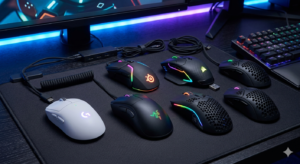
What is a Gaming Mouse?
A gaming mouse is a specialized computer mouse built specifically for gaming. It offers higher precision, faster response time, and customizable controls compared to standard mice.
Key Differences from Regular Mouse:
- Higher DPI (Dots Per Inch)
- Faster polling rate (1000Hz or more)
- Extra programmable buttons
- Better ergonomics
- RGB lighting customization
Types of Gaming Mouse
Choosing the right type depends on your gaming style and preferences.
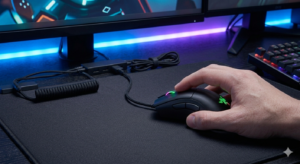
1. Wired Gaming Mouse
Wired gaming mice connect via USB cable and provide:
- Zero latency
- Stable connection
- No need for a battery
Best for: Competitive gamers
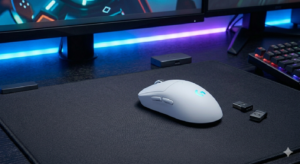
2. Wireless Gaming Mouse
Modern wireless mice offer:
- Low latency (almost the same as wired)
- Clean desk setup
- Portability
Best for: Casual and pro gamers who prefer no cables
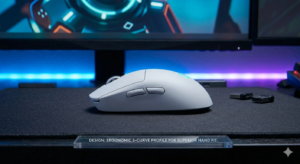
3. Ergonomic Gaming Mouse
Designed to reduce strain and improve comfort.
Features:
- Natural hand position
- Reduced wrist pain
- Ideal for long sessions
4. Ambidextrous Gaming Mouse
Can be used by both left-handed and right-handed users.
Best for:
- Shared setups
- Left-handed gamers
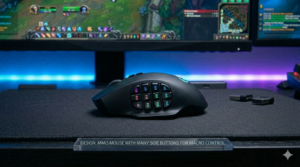
5. MMO Gaming Mouse
Built for massively multiplayer online games.
Features:
- 10–20 programmable buttons
- Macro support
Important Features of a Gaming Mouse
Understanding these features will help you choose the best mouse.
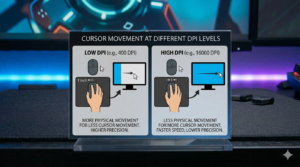
1. DPI (Dots Per Inch)
DPI determines how sensitive your mouse is.
- Low DPI (400–800): Better for FPS aiming
- Medium DPI (800–1600): Balanced usage
- High DPI (1600+): Faster movement
2. Polling Rate
Polling rate shows how often the mouse reports its position to the computer.
- 125Hz = 8ms delay
- 500Hz = 2ms delay
- 1000Hz = 1ms delay
Higher polling rate = smoother performance.
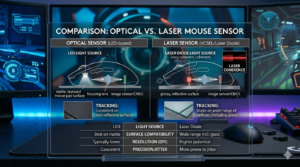
3. Sensor Type
There are two main types:
Optical Sensor
- More accurate
- Better for gaming
Laser Sensor
- Works on more surfaces
- Slightly less precise
4. Programmable Buttons
Gaming mice often have extra buttons for:
- Macros
- Weapon switching
- Custom commands
5. RGB Lighting
RGB lighting enhances aesthetics and can be customized.
6. Build Quality
Look for:
- Durable switches
- Strong cable (for wired)
- Solid materials
7. Weight
- Lightweight mouse = faster movement
- Heavy mouse = more control
Gaming Mouse Grip Styles
Your grip style affects your performance.
1. Palm Grip
- Full hand rests on the mouse
- Comfortable for long use
2. Claw Grip
- Fingers arched
- Better control and speed
3. Fingertip Grip
- Only fingertips touch the mouse
- Fast but less stable
Best Gaming Mouse for Different Games
FPS Games (e.g., shooting games)
- Low DPI
- Lightweight mouse
- High precision sensor
MOBA Games
- Multiple buttons
- Medium DPI
MMO Games
- Many programmable buttons
- Macro support
Wired vs Wireless Gaming Mouse – Which is Better?
| Feature | Wired | Wireless |
|---|---|---|
| Latency | Very Low | Low |
| Convenience | Less | High |
| Battery | Not needed | Required |
| Price | Lower | Higher |
How to Choose the Best Gaming Mouse
Here are some key buying tips:
1. Know Your Budget
- Budget mice: Basic features
- Mid-range: Good performance
- Premium: Best sensors & build
2. Check Compatibility
- Works with your PC/laptop
- Software support available
3. Consider Hand Size
- Small, medium, and large options available
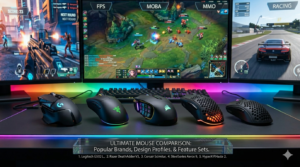
4. Look at Brand Reputation
Popular gaming brands include:
- Logitech
- Razer
- Corsair
- SteelSeries
Top Gaming Mouse Features to Look For in 2026
- Ultra-lightweight design
- AI-based tracking
- Wireless fast charging
- Custom profiles
- Advanced sensors (20,000+ DPI)
Common Mistakes When Buying a Gaming Mouse
Avoid these mistakes:
- Choosing only based on RGB
- Ignoring hand size
- Buying too many buttons unnecessarily
- Not checking sensor quality
Gaming Mouse Maintenance Tips
To keep your mouse in good condition:
- Clean regularly
- Use a mouse pad
- Avoid dropping
- Update software
Gaming Mouse Accessories
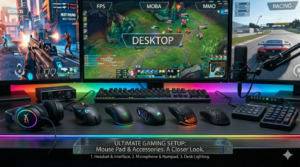
1. Mouse Pad
- Improves tracking
- Enhances performance
2. Mouse Bungee
- Keeps cable organized
3. Grip Tape
- Better control
Advantages of Using a Gaming Mouse
- Better accuracy
- Faster reaction time
- Comfortable design
- Customization options
Disadvantages of Gaming Mouse
- More expensive
- Learning curve for beginners
- Extra features may be unnecessary
Future of Gaming Mouse
The future of gaming mice includes:
- AI-enhanced tracking
- Gesture control
- Improved battery life
- Cloud-based customization
Conclusion
A gaming mouse is more than just a device—it is a powerful tool that can enhance your gaming skills and overall experience. By understanding different types, features, and usage, you can choose the perfect mouse that fits your needs and budget.
Whether you are a beginner or a professional gamer, investing in a good gaming mouse will always give you a competitive edge.
Frequently Asked Questions (FAQs)
1. Is a gaming mouse worth it?
Yes, especially for gamers who want better performance and control.
2. What DPI is best for gaming?
- FPS: 400–800 DPI
- General: 800–1600 DPI
3. Can I use a gaming mouse for work?
Yes, it works great for both gaming and productivity.
4. How long does a gaming mouse last?
Typically 2–5 years, depending on usage.